 Loading Please Wait...
Loading Please Wait...
Loading Please Wait...
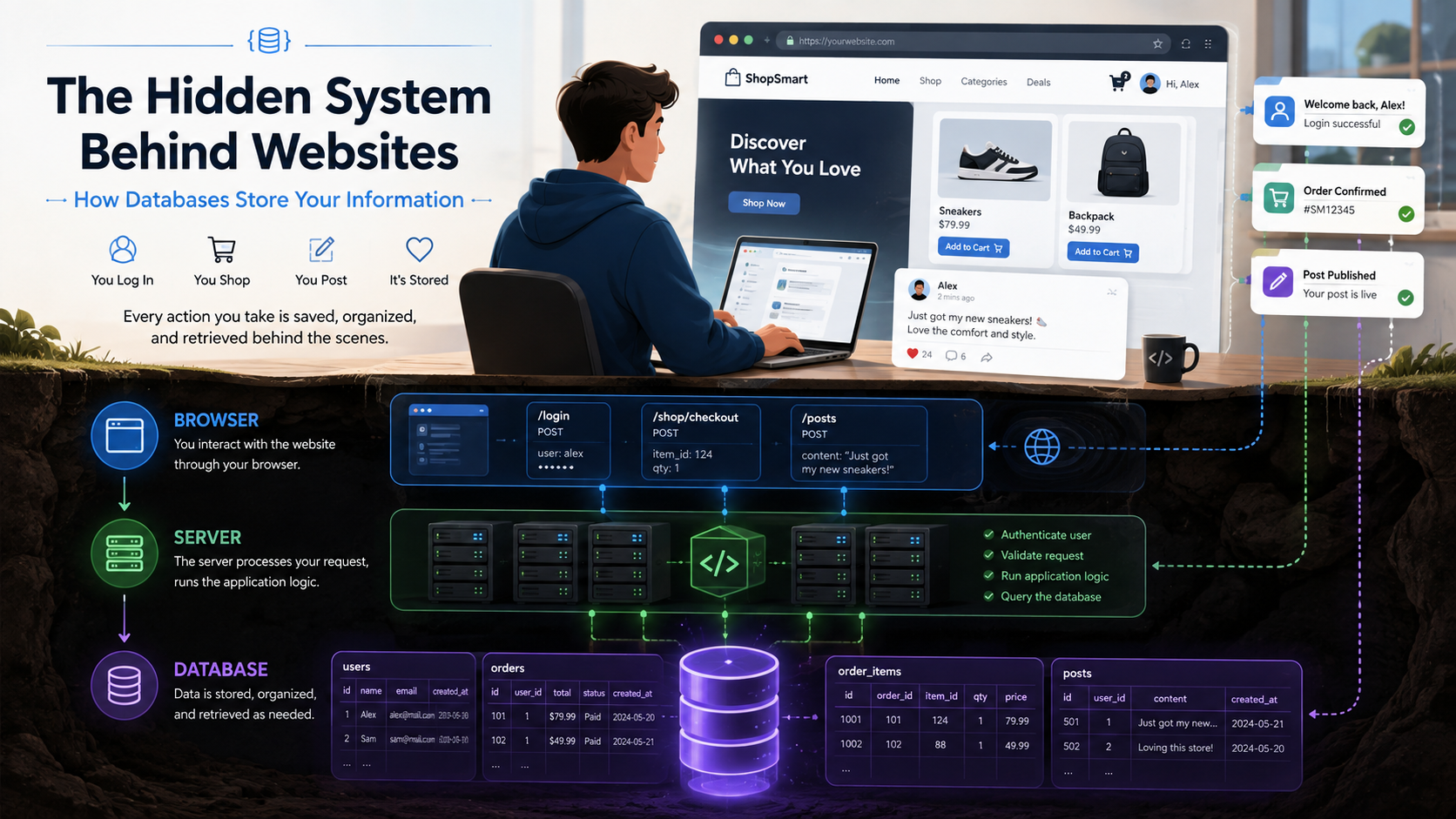
Whenever you log in, add something to your cart, like a post, book a ticket, or update your profile, the site has to keep track of that action. The website remembers what you did.
But how?
Your browser does not keep everything permanently, and the website itself cannot simply “remember” millions of users on its own. In most cases, that job belongs to a database.
Databases sit at the heart of many modern websites and apps. They keep the information a site needs organized and available when it is needed. Your account details, order history, saved preferences, and much more usually depend on a database working quietly in the background.
This guide explains why websites use databases, what happens to your information after you submit it, how that data is organized and retrieved, and how SQL differs from NoSQL.
A database is an organized system for storing and managing information.
A useful way to picture a database is as a digital filing system—except it can sort, search, update, and connect information far more efficiently than a folder of documents.
A website database might store information such as:
A database is useful for more than simply holding information. It gives a website a practical way to find, update, connect, and manage that information when it is needed.
For example, when you open an online shopping website and go to “My Orders,” the website does not search through thousands of files manually. Instead, it asks the database for the orders linked to your account.
The database looks up the matching records and returns them to the website.
Imagine an online shop with only ten products.
With so little data, the owner could get away with keeping the product details in a simple file.
Now scale that shop up to millions of customers, thousands of products, daily purchases, reviews, delivery addresses, payment records, and constantly changing inventory.
At that size, ordinary files become hard to search, update, and keep consistent.
A database makes the job manageable by organizing the information in a form the website can search and update efficiently.
They allow websites to:
This is why almost every large interactive website depends on some form of database.
Suppose you create an account on an online store.
You enter your name, email address, and password and click Create Account.
A simplified version of what happens looks like this:
You → Website → Server → Database
The first step is simple: your browser sends the details you entered to the website's server.
The server checks whether the information is valid. For example, it may check whether that email is already in use or whether the password meets the site's rules.
Once those checks pass, the server saves the required details in the database.
That usually means creating a new user record containing details such as:
| User ID | Name | |
| 1001 | Rahul | rahul@example.com |
| 1002 | Sara | sara@example.com |
After the record is saved, the server replies to your browser to confirm that the account was created.
When you return later and log in, the website can look up that stored account in the database.
One common type of database organizes information using tables.
A table looks somewhat like a spreadsheet.
For instance, a website might keep account information in a table named Users.
In that table, each row could represent a user, and each column could hold one type of detail.
A website might also have separate tables for:
Rather than cramming every type of information into a single table, the website splits it into separate, meaningful groups.
Each record usually has a unique identifier.
For example:
User ID: 1001
The ID gives the database a reliable way to tell users apart, even when two people share the same name.
Databases can receive instructions called queries.
A query is simply an instruction that tells the database what information to return or change.
When you log in, the website might effectively ask:
Find the account associated with this email address.
A product search could translate into a request like this:
Find products where the category is “laptops” and the price is below ₹60,000.
Database systems are built to handle these lookups efficiently, even when they are working with very large collections of records.
Developers commonly perform four basic types of operations with data:
Together, these are often called CRUD operations.
Most things you do on a website involve one or more of these actions.
Databases become especially useful when separate pieces of information need to be linked together.
Consider an online shopping website.
The website may have separate data for:
Users → Orders → Products
Suppose your user ID is 1001.
When you place an order, the database can save your user ID as part of that order.
That way, the site does not need to copy all of your personal details into every order record; it can link the order back to your account instead.
A single user might have many orders.
Each order might contain several products.
This creates relationships between different pieces of information.
These links help a website represent complicated information without storing the same details again and again.
As you learn about databases, two terms come up again and again: SQL and NoSQL.
They are different approaches to storing and managing information.
SQL databases generally keep data in structured tables made up of rows and columns.
Popular examples include:
SQL databases work particularly well when information has clear relationships.
An online store, for example, might use separate tables for customers, products, orders, and payments.
That structure makes SQL a strong fit for systems where consistent data and clear relationships matter, including financial software, inventory systems, booking platforms, and online stores.
NoSQL databases take a more flexible approach to how data is organized.
Depending on the database, information might be stored as documents, key-value pairs, graphs, or other formats rather than traditional tables.
Examples include:
A NoSQL database can be useful when applications need flexible data structures, very large-scale systems, fast access, or particular forms of distributed storage.
That flexibility does not make NoSQL universally better than SQL.
The right database depends on what the application needs.
In practice, many modern applications use SQL and NoSQL side by side, choosing each for the jobs it handles best.
Buying something online is a good example of how several database actions can sit behind one simple click.
Imagine choosing a pair of headphones and pressing Buy Now.
The site may begin by pulling the headphone details from the database.
Next, the server checks the inventory to make sure the item is still available.
After you confirm the order, a payment service processes the payment.
Once the payment goes through, the website can create a new order record.
That order may include information such as:
The database may then update the available inventory.
So something that looks like one button click to you may actually involve several database operations behind the scenes.
Because databases can hold sensitive personal and business information, protecting them is a major part of website security.
Good systems use several layers of protection.
Access, for instance, can be limited so only approved systems and authorized employees can reach specific data.
Sensitive information may also be encrypted.
Passwords require special treatment. Responsible websites should not store passwords as ordinary readable text. Instead, passwords are normally processed using secure password-hashing techniques.
Other protection methods can include:
Protecting the database alone is not enough, though; a weakness elsewhere in the application can still expose or misuse the information it holds.
Because databases are so important, a database failure can affect an entire website.
You might see problems such as:
Large online services are usually designed so one failed machine does not bring the entire system down.
One common technique is replication, which keeps copies of the same data on more than one database server.
Backups provide another safety net, allowing data to be recovered if a serious problem occurs.
These systems become increasingly important as websites grow.
No.
A basic static website can work perfectly well without a traditional database.
A simple portfolio, for example, might contain only a homepage, an About page, a Contact page, HTML, CSS, JavaScript, and images.
A database becomes much more useful once the site needs to save information that changes over time.
A database is commonly needed when a website includes things such as:
A simple rule of thumb is this: the more a website needs to remember, update, and manage information, the more valuable a database becomes.
You probably use database-driven systems many times a day without ever seeing the databases behind them.
On a social media platform, databases may store your profile, posts, followers, comments, and likes.
A streaming service may keep your account details, watch history, preferences, and saved titles in databases.
An online marketplace may use them for product listings, carts, orders, reviews, and delivery information.
A ride-booking app may rely on databases to manage riders, drivers, trips, locations, and payments.
What you see on screen is only the front end of that system.
Behind it, databases are constantly reading and updating information.
Databases are one of the hidden systems that make the modern internet work.
When a site remembers your account, shows an old order, loads a message, saves a comment, recommends content from your activity, or updates product stock, there is a good chance a database is involved somewhere behind the scenes.
You can think of the basic flow like this:
Browser → Server → Database → Server → Browser
You perform an action. The browser sends a request. The server decides what needs to happen. The database stores or retrieves the required information. The result is then returned to you.
Once this request-and-response flow makes sense, the rest of a website's behavior becomes easier to follow. Databases are not simply places where information sits. They are working systems that help websites store, organize, connect, update, and retrieve information as people use the site.
And that is why databases are one of the most important technologies working quietly behind almost every website you use.