 Loading Please Wait...
Loading Please Wait...
Loading Please Wait...
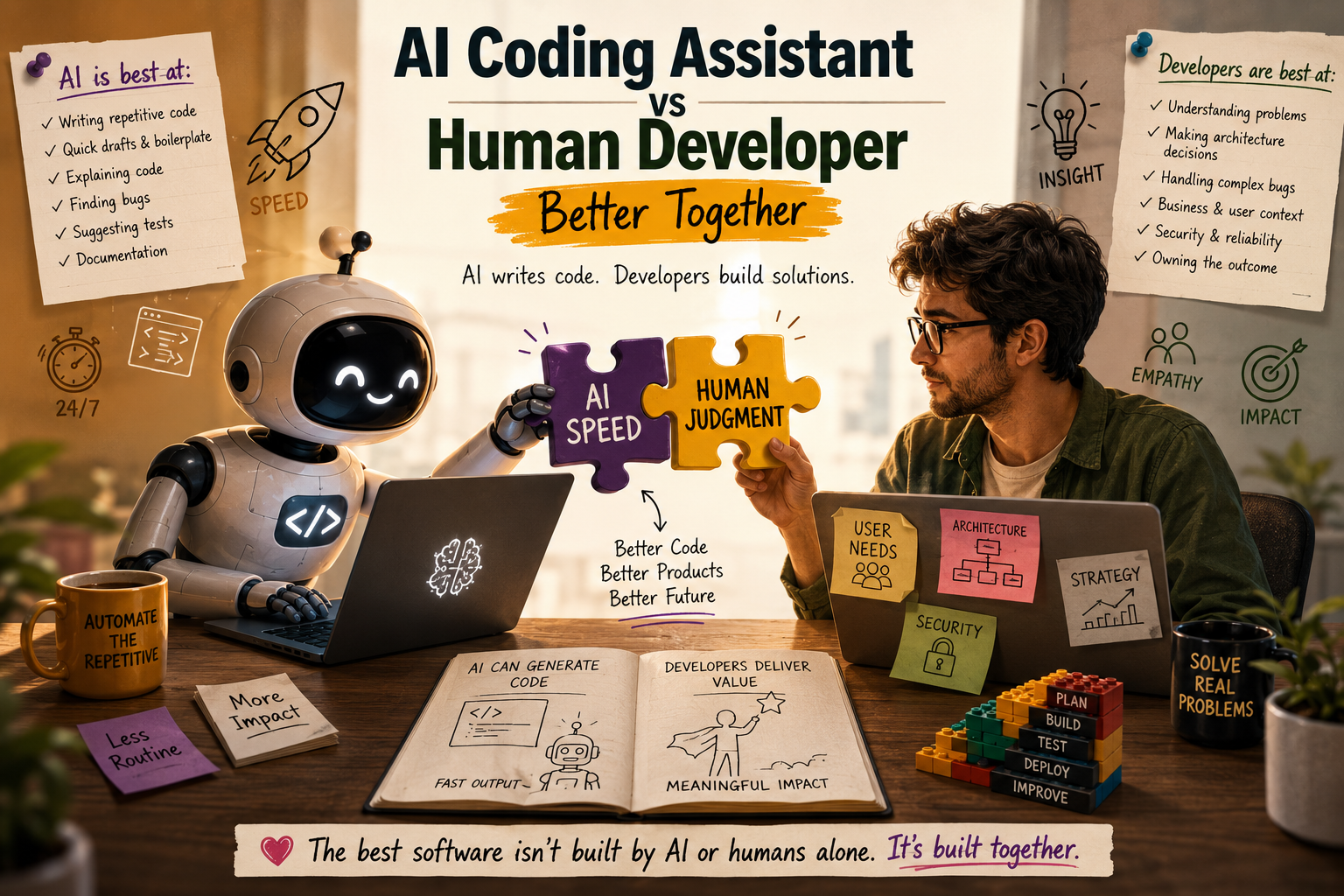
A developer needs to create an API endpoint. Instead of writing everything manually, they describe what they need to an AI coding assistant. A few seconds later, there is working code on the screen.
It is easy to look at that and think:
If AI can write code this quickly, why do we need developers?
But writing code is only one part of software development.
Building useful software also involves understanding the problem, choosing the right approach, thinking about security, handling unusual situations, testing the system, maintaining it, and deciding whether a solution actually makes sense for the business and its users.
That is why comparing an AI coding assistant vs a human developer is not really about deciding which one is better overall.
A better question is:
What is AI better at, what are developers better at, and when should we use each?
Let's break it down with practical examples.
An AI coding assistant is a tool that helps developers perform programming tasks using code, natural-language instructions, and context from a project.
Depending on the tool, it may help you:
Modern tools are also moving beyond simple autocomplete. Some coding agents can inspect a project, modify files, run tasks, and work through larger development requests. GitHub Copilot, for example, currently supports code completion, chat, code review, agent modes, and other development workflows across supported environments.
That makes AI extremely useful.
But useful does not mean reliable in every situation.
Developers often write code that follows patterns they already understand.
Suppose you are building an e-commerce backend and need API endpoints for:
The structure of many endpoints may be similar: receive input, validate it, communicate with the database, and return a response.
Instead of writing every piece manually, AI can generate a starting point.
The developer can then review and adjust it.
This is where AI provides real value: reducing repetitive typing without removing the developer from the decision-making process.
Sometimes the hardest part of a task is simply getting started.
Imagine you need a React form containing:
AI can create an initial component quickly.
The result may not match your project's design system, validation rules, accessibility requirements, or backend exactly.
But instead of staring at an empty file, you now have something to improve.
AI is often most useful when you treat its output as a draft rather than a finished solution.
Developers do not only write new code. They spend a lot of time understanding code written by other people.
Imagine joining a project and finding a complicated function containing database queries, conditions, calculations, and several unfamiliar variables.
Instead of studying everything from scratch, you could ask:
Explain what this function does, what data it receives, what it returns, and where it might fail.
The explanation can help you understand the structure faster.
You still need to verify it, especially in a large codebase where the function depends on code the AI cannot see.
AI can also help developers think about cases they should test.
Suppose you have a function that calculates delivery charges.
You might initially test:
AI could remind you to consider:
The important distinction is that AI can suggest test cases, but a human needs to decide whether those cases match the actual requirements.
AI becomes less reliable when a task requires understanding something beyond the code itself.
Imagine a client says:
“Our checkout is slow. Can you fix it?”
The obvious response might be to optimize the code.
But what does “slow” actually mean?
Maybe:
Writing code before understanding the problem could waste hours.
A good developer first investigates.
That ability to turn an unclear complaint into a specific technical problem is an important part of software development.
Suppose you are building an application that stores user accounts, payments, images, notifications, and order information.
There are many questions to answer:
How should authentication work?
Where should images be stored?
How should services communicate?
Which information should be cached?
How should the application handle a sudden increase in traffic?
What should happen if an external service goes offline?
AI can explain different approaches and compare their advantages and disadvantages.
But there may not be one universally correct answer.
The right decision depends on factors such as:
That is where experience and judgment matter.
Consider a company adding a Save for Later feature to its shopping website.
Generating the button and database logic is relatively straightforward.
But then questions appear.
What happens when a saved product goes out of stock?
Should users see the price they originally saved or the current price?
Should the company notify them after a price drop?
How long should saved items remain for users who are not logged in?
Should discontinued products automatically disappear?
These are not simply programming questions.
They are product and business decisions.
AI can suggest possibilities, but someone needs to decide what behavior actually makes sense for the company and its customers.
This is one area where saying “AI is better” or “developers are better” can be misleading.
AI can be very helpful when the problem is clear.
Suppose you receive:
TypeError: Cannot read properties of undefined
Provide the relevant code, and an AI assistant may identify the likely cause quickly.
Now consider a different situation.
A payment occasionally fails, but:
There is no single error message to paste into an AI tool.
A developer may need to inspect application logs, user sessions, network requests, payment responses, database records, deployment changes, and device-specific behavior.
AI can help during that investigation, but the developer still has to determine what evidence matters and what to investigate next.
| Task | Better Role |
| Repetitive code | AI can save time |
| Boilerplate code | AI is useful for first drafts |
| Code explanation | AI can speed up understanding |
| Documentation drafts | AI can reduce manual work |
| Test ideas | AI can suggest cases; humans verify requirements |
| Clear, isolated bugs | AI can assist effectively |
| Complex production bugs | Human investigation is critical |
| System architecture | Human judgment should lead |
| Business requirements | Humans need to define them |
| Security review | AI can assist, but expert review matters |
| Final production decision | Human/team responsibility |
The point is not that AI cannot contribute to architecture, debugging, or security.
It can.
The difference is that the output should not automatically become the decision.
AI coding tools have made programming accessible to people who previously could not build software themselves.
That is a major advantage.
A founder, designer, marketer, or business owner can create prototypes, automate repetitive work, or test an idea without first becoming an experienced programmer.
The danger appears when “the application runs” becomes “the application is correct.”
These are not the same thing.
Code can work during a demo and still contain:
GitHub's own Copilot documentation warns that generated code may not always be correct or optimal and may contain security vulnerabilities, recommending that users review and validate generated code before production use.
For a simple personal tool or prototype, the risk may be manageable.
For an application handling payments, customer data, healthcare information, confidential business information, or thousands of users, technical review becomes much more important.
Consider these two requests.
Request 1:
Build an image upload API.
Request 2:
Create a FastAPI endpoint for profile images. Accept JPEG and PNG files, limit files to 5 MB, reject unsupported formats, generate unique filenames, return appropriate HTTP errors, and include tests for invalid file type and oversized files.
The second request is likely to produce a more useful result.
Why?
Because the person asking already understands some of the problems that need to be solved.
Experienced developers can give AI better constraints because they know what questions to ask.
They can also look at the generated result and notice:
This input is not validated.
This database query will become expensive.
This error should not be shown to the user.
This function is doing too many things.
This authentication check is missing.
That is why AI does not make technical knowledge less valuable.
In many cases, technical knowledge makes AI more useful.
Nobody can predict exactly how software development roles will change.
What is already clear is that AI tools can automate parts of the development workflow that previously required more manual effort.
That may mean developers spend less time writing routine code and more time:
The job is not just typing code faster.
The real skill is turning a problem into software that works reliably.
AI coding assistants are particularly useful for speed.
They can generate drafts, remove repetitive work, explain code, suggest tests, and help developers explore possible solutions faster.
Human developers bring context and judgment.
They decide what should be built, which trade-offs are acceptable, how systems should fit together, whether generated code can be trusted, and what happens when something goes wrong.
So the most useful comparison is not:
AI coding assistant vs human developer.
It is:
Human developer with AI vs human developer without AI.
AI can make development faster.
But knowing what to build, how to evaluate the result, and when not to trust the generated code is still a human responsibility.
And that is the key idea worth remembering:
AI can help produce code. A developer has to make sure that code solves the right problem.