 Loading Please Wait...
Loading Please Wait...
Loading Please Wait...
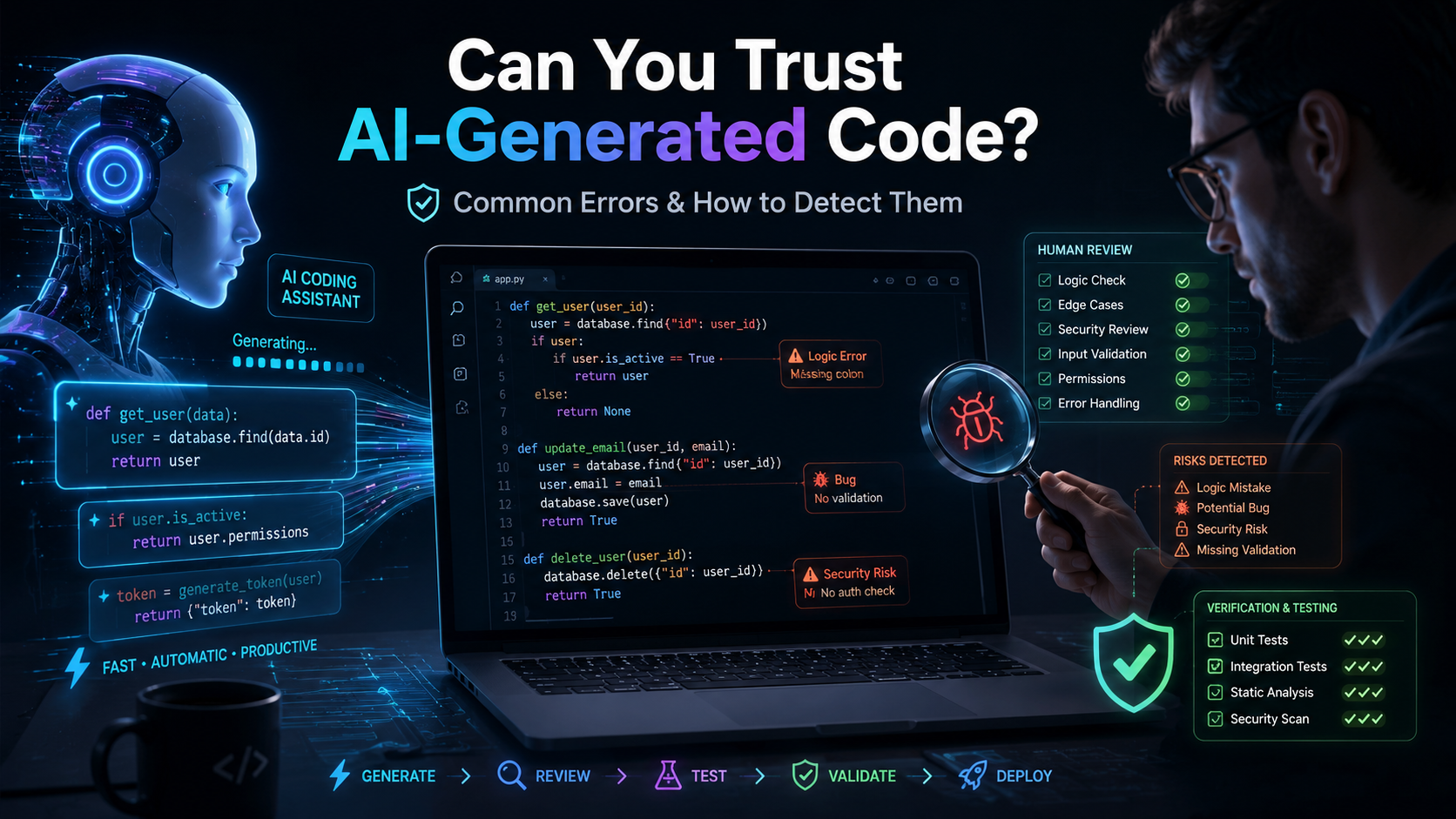
AI coding tools can write functions, fix bugs, explain unfamiliar code, and even build small applications from a simple prompt. For experienced developers, this can save time. For non-coders, it can make software creation feel possible without years of technical training.
But there is an important question behind that convenience: Can you trust AI-generated code?
The honest answer is: not completely.
AI-generated code can be useful, fast, and surprisingly accurate. It can also contain logic errors, security weaknesses, outdated methods, and incorrect assumptions. The biggest danger is not always code that crashes. It is code that appears to work while producing the wrong result.
That does not mean you should avoid AI coding tools. It means you should treat them as helpful assistants, not unquestionable experts.
AI-generated code is software code created by an artificial intelligence tool from instructions written in normal language.
For example, a user might ask:
“Create a Python function that calculates a price after applying a discount.”
The AI may produce:
def final_price(price, discount):
return price - discount
The code runs, but is discount a fixed amount or a percentage? If the user expects a 20% discount on a price of 200, the correct result is 160. The generated function returns 180.
This is an important lesson: working code is not always correct code.
Developers use AI to generate repetitive code, explain errors, write tests, and create documentation.
Non-coders may use it to create simple websites, automate spreadsheets, rename files, connect online services, or build early prototypes.
The main attraction is speed. A task that once took hours may take minutes. However, fast output can create false confidence. Because AI-generated code often looks professional, users may assume it has already been checked. Usually, it has not.
Experienced developers have an advantage because they can review the output before using it. They may notice missing validation, inefficient logic, poor architecture, or security risks.
Imagine an AI generates this function:
def find_user(users, email):
for user in users:
if user["email"] == email:
return user
A coder may ask:
Developers understand that software must handle bad input, unexpected conditions, and performance requirements.
Still, coders are not automatically safe. A developer working quickly may copy code without reviewing it. They may also trust AI in an unfamiliar area such as encryption, cloud configuration, or payment processing. AI output can look convincing even when it is wrong.
For a non-coder, AI can be empowering. Someone with no programming background may create a landing page or automate a report.
The risk is that they may not know whether the code is correct or safe to run.
Suppose a user asks AI for a script that deletes duplicate files. The script may compare only filenames instead of file contents. Two different photos with the same name could be treated as duplicates, and one might be deleted.
A developer would test the script on sample files, create a backup, compare file hashes, and require confirmation before deletion. A non-coder may run it directly on an important folder.
Non-coders should begin with low-risk projects, keep backups, test on sample data, and seek expert review when code handles money, customer data, passwords, or important files.
AI may misunderstand the goal, especially when the prompt is vague. It can produce code that solves a slightly different problem.
For example, “calculate average monthly sales” could become total sales divided by 12, even when the data covers only six months.
To detect this, create a few simple examples with known answers before running the code.
AI often writes code for the normal situation but ignores unusual input.
A division function may fail when the second number is zero. A registration form may accept an empty email. A shopping cart may allow negative quantities.
Test empty values, zero, negative numbers, large values, missing fields, and incorrect data types.
AI may create unsafe database queries, weak password handling, exposed API keys, or poor permission checks.
Consider this example:
query = "SELECT * FROM users WHERE email = '" + email + "'"
Because user input is added directly to the query, this may create an SQL injection vulnerability. A safer approach uses parameterized queries.
Code involving authentication, payments, personal data, file uploads, or database access should receive expert review.
AI sometimes suggests functions, packages, or API features that do not exist.
It may generate:
image.auto_enhance_quality()
The name sounds realistic, but the library may not include that method.
Check every unfamiliar function in the official documentation.
AI may recommend deprecated functions, old packages, or instructions written for an earlier framework version.
Check official documentation and confirm the package version before installing dependencies.
Generated code may work only when everything goes perfectly. It may fail when a file is missing, a network request times out, or an API returns unexpected data.
Good code should fail safely and display useful error messages. It should not hide every problem behind a broad except statement.
A generated solution may work for 100 records but become slow with one million. It might repeat an expensive database query, call a paid API too many times, or use nested loops unnecessarily.
Test performance with realistic amounts of data, not only small examples.
AI is strong at pattern matching, standard code generation, and quick suggestions. Human developers are better at understanding the complete purpose of a project.
A coder can ask whether a feature is necessary, how a system may grow, what happens when it fails, and whether sensitive data should be stored at all.
Developers are also better at trade-offs. The fastest solution may not be the safest. The most advanced system may not be the easiest to maintain. A human can consider budget, deadlines, user experience, team skills, and long-term support.
Most importantly, developers can take responsibility for testing and maintaining the final product. AI can suggest code, but it does not truly understand your users, business, or consequences of failure.
Start with a detailed prompt. Mention the programming language, framework, input, expected output, limitations, and error cases.
Instead of writing:
“Make a login system.”
Try:
“Create a basic login endpoint in Python using FastAPI. Hash passwords, reject empty fields, return clear error messages, and never store plain-text passwords. Explain the security limitations.”
Next, ask the AI to explain the code. Ask what assumptions it made, which inputs may break it, and which parts need human review.
Request tests for normal input, empty input, invalid values, and boundary cases. AI-generated tests may also be incomplete, but they provide a useful starting point.
Build in small steps. Generating an entire application at once makes errors harder to find. Create one feature, test it, and then continue.
Finally, verify unfamiliar functions, packages, and security advice using official documentation.
Before using generated code, ask:
For production software, healthcare systems, financial tools, or customer-facing applications, testing should be much more thorough than for a small experiment.
You can trust AI-generated code as a starting point, but not automatically as a finished product.
AI can help developers work faster and help non-coders turn ideas into prototypes. It can explain concepts, reduce repetitive work, and suggest possible solutions. However, it can also generate code that is incorrect, insecure, outdated, or incomplete while sounding completely confident.
The safest approach is to use AI as a coding partner. Give it clear instructions, ask it to explain its assumptions, test every important function, verify unfamiliar features, and involve an experienced developer when the risk is high.
The best results come from combining AI’s speed with human judgment. When AI-generated code is reviewed, tested, and understood, it can be extremely useful. When it is copied blindly, even a small mistake can become a serious problem.